

Most people focus on typing speed, yet comfort plays a much bigger role in long term productivity. Anyone who spends hours writing emails, coding, gaming, or producing documents quickly learns that even minor discomfort slows everything down. Fingers hesitate. Wrists stiffen. Focus disappears.
A large study on computer use published by the National Center for Biotechnology Information found that prolonged typing with poorly designed keyboards increases the risk of wrist pain and repetitive strain injuries for office workers and writers alike.
That might sound alarming, but it also highlights something encouraging. Small design improvements in keyboards can dramatically improve comfort and efficiency.
Better keyboard design solves these issues by supporting natural hand positioning, smoother key travel, and smarter input tools.
The good news is that improving typing comfort often requires simple adjustments. With the right keyboard features and typing tools, the entire experience can become faster, healthier, and surprisingly enjoyable.
Intelligent Input Software Makes Typing Feel Effortless

Comfort is not only about the physical keyboard. The software that interprets your typing plays an equally important role. Modern input systems powered by AI can significantly reduce typing strain by predicting words, correcting mistakes, and improving typing flow.
One example often praised by multilingual typists is 搜狗输入法 (Sogou input method). Its predictive engine helps users type faster with fewer corrections, which reduces finger fatigue during long writing sessions. AI learns your style and everything becomes faster and fluent.
Reducing the number of corrections and repeated keystrokes lowers physical strain. Over time this contributes to noticeably better typing comfort, especially for writers and professionals who produce large amounts of text every day.
Key Travel and Actuation Force Shape the Typing Experience

The distance a key travels when pressed, along with the force required to activate it, has a major effect on comfort. Many inexpensive keyboards require excessive pressure or have shallow key movement that feels rigid.
Good keyboard design balances responsiveness and softness. When keys activate smoothly, fingers move naturally without unnecessary effort.
Before choosing a keyboard, pay attention to these factors.
- Short but responsive key travel improves speed because fingers move less distance while still receiving clear feedback.
- Moderate actuation force prevents finger fatigue during long typing sessions. Keys should not feel stiff.
- Consistent key response helps build muscle memory so typing becomes automatic rather than deliberate.
- Tactile feedback signals when a key press is registered, preventing repeated presses that slow down workflow.
Mechanical keyboards often excel in this area, but many modern membrane keyboards now incorporate improved key engineering as well.
Ergonomic Layout Reduces Wrist and Finger Strain
Traditional keyboard layouts were designed decades ago, long before ergonomics became a serious concern. As a result, many standard keyboards force the hands into unnatural angles.
Ergonomic keyboards attempt to correct this problem by adjusting the layout and positioning of keys.
Several common ergonomic features improve typing comfort.
- Split keyboard layouts allow each hand to rest at a natural angle rather than bending inward.
- Curved key arrangements follow the natural arc of the fingers.
- Adjustable keyboard tilt helps align wrists with forearms.
- Integrated wrist rests support the hands during pauses.
Even small ergonomic adjustments can reduce tension in the wrists and shoulders. People who write for several hours a day often notice improvements within a few weeks of switching to an ergonomic layout.
Key Spacing and Size Affect Accuracy

Another overlooked design factor is the spacing between keys. Keys that are too close together cause frequent typos, while overly large spacing forces unnecessary finger stretching.
A well balanced keyboard maintains consistent spacing that matches the natural reach of the human hand.
Did you know
Research in human computer interaction suggests that standard key spacing around 19 millimeters provides the best balance between typing accuracy and speed for most adult users.
This spacing allows fingers to move comfortably without constant visual checking of the keyboard. When spacing feels natural, typing becomes more fluid and relaxed.
Poor spacing often explains why some keyboards feel uncomfortable even when their build quality is high.
Comparing Common Keyboard Designs
Not all keyboards prioritize comfort in the same way. Some focus on portability while others emphasize ergonomics or precision typing.
The table below highlights how different keyboard types influence typing comfort.
| Keyboard Type | Comfort Level | Best For | Typical Price Range |
|---|---|---|---|
| Standard membrane keyboard | Moderate | Office work and casual typing | 10 to 40 USD |
| Mechanical keyboard | High tactile comfort | Writers, programmers, gamers | 60 to 200 USD |
| Ergonomic split keyboard | Very high | Long daily typing sessions | 120 to 300 USD |
| Low profile laptop style keyboard | Moderate but fast | Portability and travel | 40 to 150 USD |
Mechanical keyboards often deliver superior tactile feedback, while ergonomic models prioritize wrist alignment and long term comfort.
Choosing the right type depends on how many hours per day you spend typing.
Surface Materials and Keycap Texture Matter
Comfort also depends on what your fingers physically touch. Keycap materials and surface textures can influence typing accuracy and fatigue.
Glossy keycaps sometimes look attractive but can become slippery during long typing sessions. Textured keycaps provide better grip and reduce accidental slips.
Keyboard designers often use materials like PBT plastic or matte coated ABS to improve durability and comfort.
A few keycap characteristics make a noticeable difference.
- Slightly textured surfaces improve finger stability.
- Sculpted key shapes guide fingers naturally to each key.
- Durable materials maintain texture even after years of use.
When keycaps maintain their shape and texture, typing remains consistent over time.
Keyboard Positioning and Desk Setup Complete the Picture
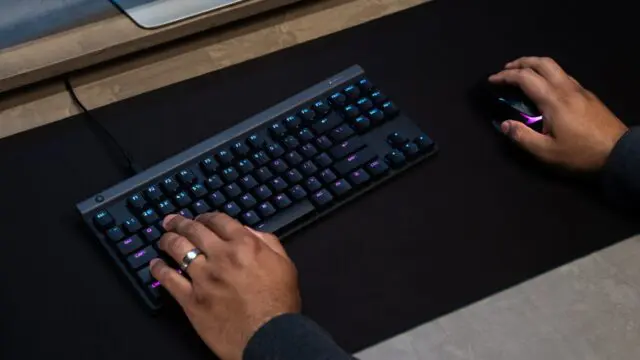
Even the best keyboard cannot deliver full comfort if the workspace setup is poor. Proper positioning ensures that the keyboard design can work as intended.
A simple desk adjustment can dramatically improve typing comfort.
Important positioning guidelines include the following.
- Keep the keyboard at elbow height so forearms remain parallel to the floor.
- Maintain neutral wrist alignment rather than bending the wrists upward.
- Position the keyboard close enough that shoulders remain relaxed.
- Use a desk chair that supports upright posture.
Important fact
The Occupational Safety and Health Administration notes that neutral wrist posture reduces the risk of repetitive strain injuries during computer work.
Combining ergonomic hardware with proper posture produces the greatest improvement in typing comfort.
Small Design Improvements Create Big Long Term Benefits
Typing comfort often feels like a minor concern until discomfort appears. Once wrists or fingers begin to ache, productivity drops quickly.
Better keyboard design prevents that situation by supporting natural hand movement, reducing typing errors, and minimizing repetitive strain. Smart input software, responsive key mechanics, and ergonomic layouts all contribute to a smoother typing experience.
Many professionals underestimate how much difference these factors make until they try a well designed keyboard setup. The change can be immediate. Typing becomes faster, quieter, and more relaxed.
Over time, improved typing comfort supports better focus and longer work sessions without fatigue. For anyone who spends hours writing, programming, or communicating online, investing in better keyboard design is not a luxury. It is one of the simplest ways to make daily computer work easier and healthier.